


If your Employee Navigator sync isn't working — census data isn't pulling in, plans aren't sending over, or you're seeing an error — the fix is usually a single step.
Check for the Company ID First
When the integration runs into trouble, the most common signal is a missing Employee Navigator company ID on the employer profile. If you don't see that ID populated, that's your cue.
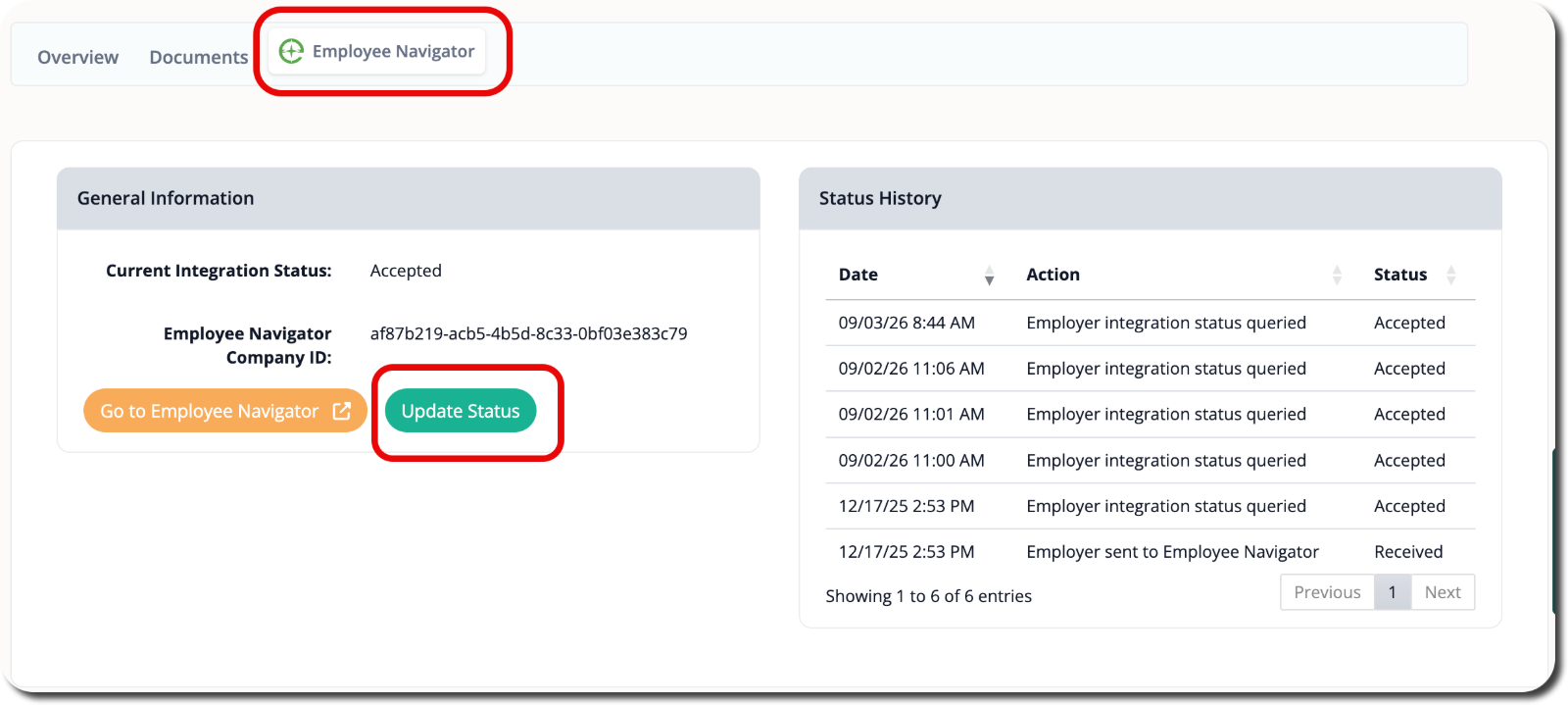
Use the Update Status Button
Plansight includes an Update Status button specifically for this situation. Click it, and the system will re-establish the connection and pull in the missing company ID. Once that ID is populated, the sync should resume normally — census data flows in and plans send over as expected.
If you're still seeing errors after hitting Update Status, confirm that the employer's Employee Navigator account is active and that your integration credentials are correctly configured in your brokerage settings.
Common Questions
- What does it mean if the Employee Navigator company ID is missing? It means the integration hasn't successfully linked the employer record yet. Hit Update Status to trigger the connection and populate the ID.
- Plans aren't sending to Employee Navigator — what do I do? Start by checking whether the company ID is present. If it's missing, use Update Status first, then retry sending the plans.
- The census isn't pulling in and I'm getting an error. Where do I start? Open the employer profile and look for the Employee Navigator company ID. A missing ID is the most common cause — clicking Update Status resolves it in most cases.
- Does Update Status affect anything else on the employer profile? No — it only refreshes the Employee Navigator connection status for that employer.